Product Description
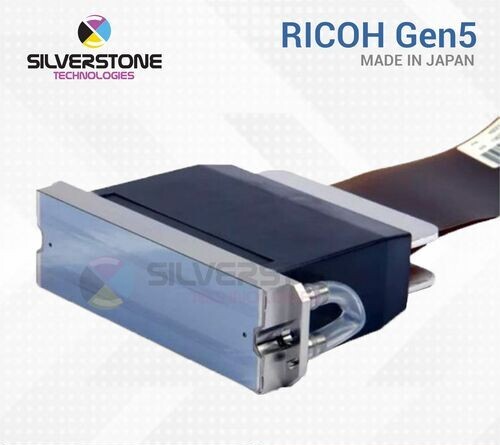
The Ricoh MH5420 printhead is a hallmark of precision and performance in the world of industrial printing. Engineered by Ricoh, a global leader in imaging and electronics, the MH5420 printhead is renowned for its exceptional reliability, versatility, and print quality. With its advanced piezo-electric technology and high-density nozzle array, the MH5420 delivers stunningly crisp and accurate prints at high speeds, making it ideal for a wide range of applications, including textile printing, signage, packaging, and more. Whether it's vibrant graphics, fine text, or intricate patterns, the Ricoh MH5420 printhead consistently delivers outstanding results, empowering businesses to achieve their printing goals with confidence and efficiency.
Advanced Printhead TechnologyThe Ricoh MH5420 Gen5 utilizes cutting-edge piezo drop-on-demand technology, offering consistent high-resolution output of up to 600 dpi. Its multi-drop capability allows flexible droplet sizes between 7 and 28 picoliters, making it suitable for a wide range of media and printing requirements.
Exceptional Durability and VersatilityEngineered with stainless steel and premium engineering plastics, the Ricoh MH5420 Gen5 provides impressive longevity-up to 100 billion actuations per nozzle. It is compatible with multiple ink types, including UV, solvent, aqueous, and oil-based inks, expanding its usability across different printing applications.
User-Friendly and Efficient OperationThe printhead supports standard electrical connections and a 24V DC power supply, simplifying integration and replacement in large format inkjet printers. With a low noise profile, custom/variable paper size support, and manageable dimensions and weight, it offers seamless, efficient operation for professional printing environments.
FAQ's of Ricoh MH5420 Gen5:
Q: How do I install the Ricoh MH5420 Gen5 printhead in my industrial inkjet printer?
A: To install the Ricoh MH5420 Gen5, ensure the printer is powered off. Connect the printhead using the provided standard electrical interface and secure it in place following the manufacturer's installation guide. Make sure the ink supply and power source (24V DC) are correctly connected before starting the printer.
Q: What types of ink are compatible with the Ricoh MH5420 Gen5?
A: The Ricoh MH5420 Gen5 is compatible with UV-curable, solvent, aqueous, and oil-based inks. This wide compatibility enables use in varied printing environments, such as textile, label, signage, and packaging applications.
Q: When should I expect to replace the Ricoh MH5420 Gen5 printhead?
A: The Ricoh MH5420 Gen5 is engineered to last up to 100 billion actuations per nozzle with proper use and maintenance. Under typical industrial printing conditions, it offers extended service life, and replacement is usually only necessary after reaching its maximum rated actuations or if print quality significantly diminishes.
Q: Where can the Ricoh MH5420 Gen5 be utilized most effectively?
A: This printhead excels in large format inkjet printers for industrial applications, including textiles, label production, packaging, and sign & display printing. Its flexible ink compatibility and high-resolution output make it suitable for professional environments demanding robust performance.
Q: What is the process for cleaning and storing the Ricoh MH5420 Gen5 printhead?
A: To clean the printhead, follow your printer's specified maintenance procedure, typically involving flushing with compatible cleaning fluid. For storage, keep the printhead in its original packaging, avoiding moisture and extreme temperatures to preserve its integrity.
Q: How does the multi-drop capability of the Ricoh MH5420 Gen5 benefit my printing operations?
A: The multi-drop capability enables the printhead to produce variable droplet sizes (7, 14, 21, 28 pl), allowing for finer detail, smoother gradients, and optimized ink usage across different substrates. This enhances image quality and printing flexibility for diverse projects.
Q: What steps should I take if my Ricoh MH5420 Gen5 printhead experiences reduced performance?
A: First, conduct standard maintenance, including cleaning the nozzles and ensuring ink lines are clear. Check operating conditions such as temperature and humidity. If performance issues persist, consult the printer's troubleshooting guide or contact Ricoh support for technical assistance.




 Send Inquiry
 Send Inquiry
 Send SMS
 Call Me Free
